What teleoperation for Unitree robots requires
A working teleop setup needs body tracking, motion retargeting from human to robot, a low-level controller that keeps a humanoid balanced, a stable link to the robot, and a way to record every session as clean, usable data.
Each of those layers has to be set up and tested against the others. For a research team, every week spent on that stack is a week without data.
The DIY route
Open-source projects like TWIST2 show what building it yourself looks like. Research code is written to prove a method, then shared. Setup, integration, and daily reliability are left to whoever clones it, and when something breaks mid-experiment, the help desk is a GitHub issues page.
The same pattern holds across most teleop options. A team gets a control interface. Integration, data handling, and support stay on the team’s plate.
Unitree XR teleoperation, ready on arrival
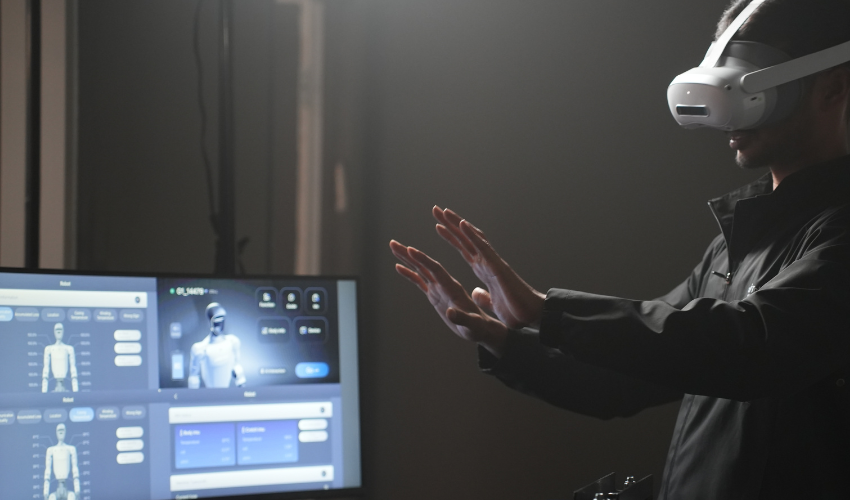
Tobor Harness comes set up and configured by Toborlife AI before it ships. The team unboxes it, puts on the headset, and starts teleoperating and recording data right away.
The kit centers on Unitree XR teleoperation: a PICO 4 Ultra mixed reality headset paired with motion trackers for full-body tracking. The operator moves, and the G1 follows, walking and manipulating in real time with stereo vision streamed back to the headset.
Stereo vision gives the operator depth. Judging distance to a cup handle or a drawer pull works the way it does in person.
No dependencies to install. No SDK to rebuild. The first day goes to data collection.
A semester-long project can spend its first weeks recording demonstrations. Setup time drops out of the schedule, and so does the risk of losing a grad student to integration work.
One pipeline, from demo to deployment
Most teleop systems stop at control. Tobor Harness covers the full path a research team actually needs:
1. Teleoperation: Full-body XR control of the G1 Edu.
2. Data collection: Every session is recorded as training data.
3. Data editing and cleaning: Bad takes get trimmed and noisy segments get fixed before they reach a training run.
4. Deployment: Clean data feeds the policies that end up running on the robot.
Each stage hands off to the next inside one ecosystem. Teams skip the glue code between a teleop tool, a recording script, and a separate cleanup workflow.
That matters most at scale. A few demos can be cleaned by hand. A few hundred need a system built for it, and Tobor Harness puts editing and cleaning in the same place the data was recorded.
Whole-body control with dexterous hands
Plenty of teleop setups handle arms only, with the robot fixed in place. That limits the data to tabletop tasks.
Tobor Harness runs whole-body control. The G1 balances, steps, and reaches as one coordinated system, so operators can record tasks that combine walking and manipulation: crossing a room to pick up an object, or crouching to open a low drawer.
At the end of each arm, dexterous hand options capture fine finger-level manipulation. That’s the kind of data a manipulation policy needs, and it’s the hardest kind to collect with a parallel gripper.
When to buy a Unitree teleoperation system
Building from open source makes sense for a lab whose research question is teleoperation itself. If the team’s contribution is a new retargeting method or a new controller, owning every layer of the stack is the point.
Most teams have a different goal. For training and research groups, teleoperation for Unitree robots is how the dataset gets built. They need demonstrations to train policies, and the teleop system is a means to that end. For them, the right move is to buy a Unitree teleoperation system that works on day one and comes with people to call when it doesn’t.
Toborlife AI is an official Unitree partner based in Silicon Valley, with Unitree-trained technicians and local support across North America. When something needs attention, the fix comes from the team that configured the system in the first place.
See Tobor Harness in action
Tobor Harness turns a Unitree G1 into a data collection platform from the first session. See the full system and configuration options on the Unitree teleoperation product page.

Comments are closed for this post.