Built to Carry AI Into Real Deployment
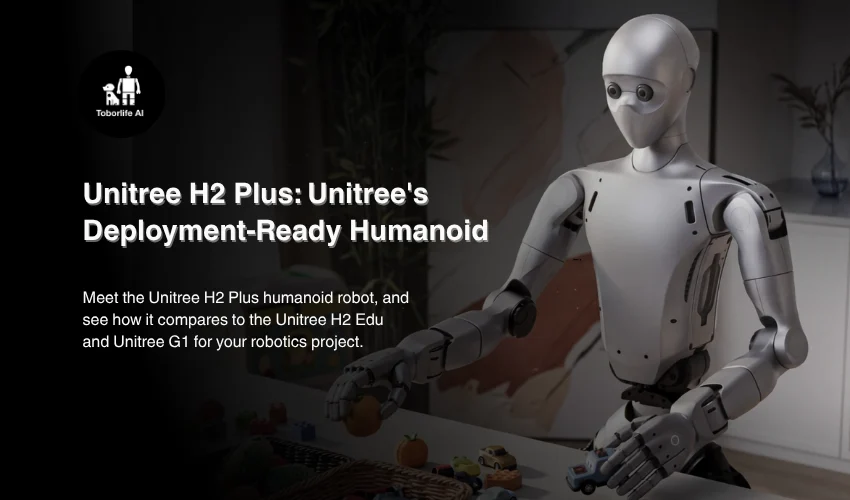
The H2 Plus is built as the hardware body for NVIDIA’s Isaac GR00T reference humanoid, and it’s designed to carry an NVIDIA Jetson AGX Thor module onboard, delivering roughly 2,070 TFLOPS of AI compute so trained models can run directly on the robot instead of relying on a cloud connection. That’s what lets the H2 Plus move from a research setting into real industrial work: warehouse and logistics tasks, manufacturing support, and jobs where a robot needs to sense, decide, and act in real time.
It also supports stereo vision for depth perception and, with a dexterous hand like the Dex3-1 (7 DOF, with an optional tactile array) or the higher-end Dex5-1 (16 DOF), the kind of fine manipulation needed for sorting, packing, or handling irregular objects. Paired with NVIDIA’s Isaac Sim and Isaac Lab tools, teams can train a task in simulation and then run it on the same hardware on the floor, shortening the path from pilot project to actual deployment.
The Unitree H2 Edu: Build Your Own Configuration
The H2 Edu shares the exact same body, sensors, and hand options as the H2 Plus, so it isn’t a lower-spec robot. The difference comes down to Thor: on the H2 Edu, the Jetson AGX Thor module isn’t included by default, and gets added on separately if and when your project needs that onboard AI compute. That keeps cost down for teams whose work doesn’t call for heavy onboard inference yet, and makes the H2 Edu a natural fit for university robotics programs and R&D teams building their own perception and control stacks from the ground up.
Everything else, the body, the sensors, and the same hand options available on the H2 Plus, carries over. It really comes down to whether Thor ships with the robot or gets added later, on your own timeline.
The Unitree G1: Compact and Research-Ready
The G1 is Unitree’s smaller, more compact humanoid, small, light, and foldable enough to move easily between locations, which makes it a budget-friendly fit for labs, classrooms, and small teams. It’s the platform teams reach for when the goal is research, teleoperation, imitation learning, or human-robot interaction studies, which is exactly why we built Tobor Harness™ teleoperation around the G1.
In practice, that means the G1 shows up most often in university labs testing new control algorithms, teams collecting demonstration data for training future models, and classrooms giving students hands-on time with a real humanoid without needing a dedicated facility to support it.
Unitree H2 Plus vs H2 Edu vs G1: How to Choose
When teams come to us weighing the H2 Plus, H2 Edu, and G1 against each other, it helps to think of it less like a spec comparison and more like matching the robot to the stage your project is at, and how much you want to build yourself versus have set up for you. For teams specifically weighing Unitree H2 vs Unitree G1, the short version is size and purpose: the G1 is built for early-stage research and teleoperation, while the H2 family is built for human-scale physical work.
Choose the G1 if you’re focused on research, teleoperation, or education, and want a lower-cost, portable platform to get started. It’s also a strong fit if you’re still figuring out which tasks you want a humanoid to handle in the future, since it’s built for experimentation rather than committing to a single workflow.
Choose the H2 Edu if you’re ready for a human-scale robot and want to add a dexterous hand and Thor compute on your own timeline, rather than paying for AI compute your project might not need yet.
Choose the H2 Plus if you know the specific deployment you’re building toward and want Thor’s 2,070 TFLOPS of onboard compute already built in.
None of the three are really rivals. Many teams start on a G1 for early research, move to an H2 Edu to build and test a custom configuration at full scale, and land on an H2 Plus once they’re ready to move that configuration into deployment.
Why Work With Toborlife AI as Your Unitree H2 Robot Distributor
The H2 Plus and H2 Edu can each be configured a number of ways: whether you add Thor, and which dexterous hand you pair it with, from a simple parallel gripper up through 16- and 21-DOF five-finger hands, both affect what the robot can actually do. Getting that configuration right matters as much as picking the base robot, and it’s easy to either overspend on compute you don’t need yet or underspec a robot that can’t grow with your project.
As an official Unitree partner based in the USA, Toborlife AI works with organizations across the G1 and H2 lineup every day, helping teams land on the right configuration for their use case. Whether you’re deciding between the G1, H2 Edu, and H2 Plus, or you already know which one you need and want help picking a hand and compute setup, we’re here as your Unitree H2 robot supplier so that the decision isn’t made blind.
The Bigger Picture
The G1, H2 Edu, and H2 Plus reflect different points along the same journey: one gets a team hands-on with humanoid robotics quickly and affordably, another lets you build your own configuration at full human scale, and the third carries that work into real deployment with Thor already on board.
If you’re trying to figure out which one fits where you are right now, or how to configure an H2 Edu or H2 Plus once you’re ready for it, Toborlife AI is a solid place to start digging in.

Comments are closed for this post.